Building My Proxmox Homelab: A Sandbox for Networking and Security
21 Sep 2026
Reading time ~2 minutes
I wanted a place to break things without breaking anything that mattered — so I built a homelab.
Why a Homelab?
Certifications and coursework teach you the theory, but nothing beats configuring a firewall, standing up a domain, or chasing down why a service won’t come back online at 1 am. A homelab is where that hands-on learning happens on your own terms, and it’s the project I keep coming back to outside of class.
The Foundation
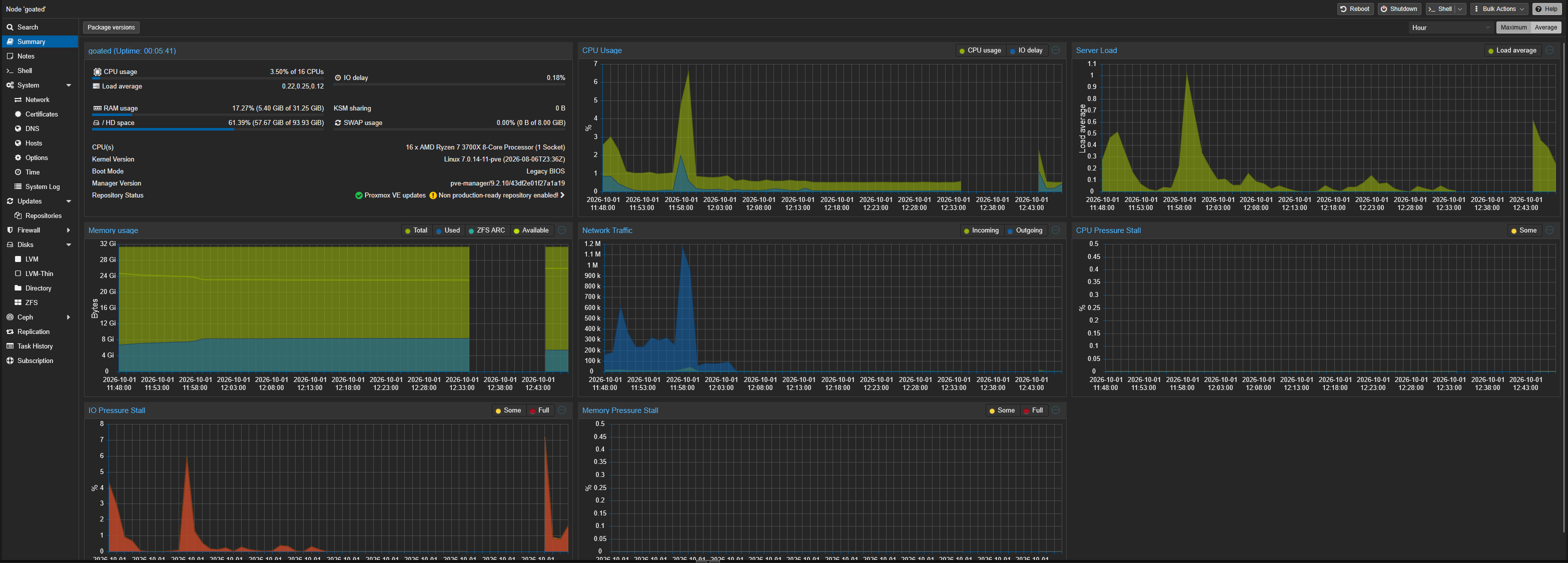
The lab runs on an old computer repurposed into a Proxmox VE host — proof that you don’t need a rack of enterprise gear to start learning virtualization and networking seriously. Proxmox turned that single machine into a flexible playground for spinning up, breaking, and rebuilding virtual environments as often as I want.
What’s Running (and What’s Coming)
Right now the lab is a Proxmox host with an evolving list of services I’m actively building out:
- pfSense (running) — a virtual firewall to practice network segmentation and traffic control Read the build log →
- Parrot Security VM (running) - a pentesting VM, accessed over SPICE for remote desktop Read the build log →
- Active Directory — a domain controller paired with a Windows 11 workstation, for hands-on AD administration and Windows domain security
- A SIEM — for centralized logging and log analysis practice
- A k3s cluster — lightweight Kubernetes, for container orchestration experience
Each piece adds a new layer to defend, monitor, or exploit — which is the point.
The Real Value: A Pentesting Sandbox
Beyond infrastructure practice, the lab doubles as a sandbox for ethical hacking. In this safe, isolated environment, I can practice offensive techniques against systems I own and control, then flip perspectives and think about how I’d detect and defend against the same attack. That back-and-forth between building and breaking is where a lot of the real learning happens.
What’s Next
As each component comes online, I’ll be posting build logs here — what I configured, what broke, and what I learned fixing it. Next up: getting pfSense running as the network’s edge firewall.
Got a homelab of your own, or curious about a specific part of the setup? Reach out — [email protected].